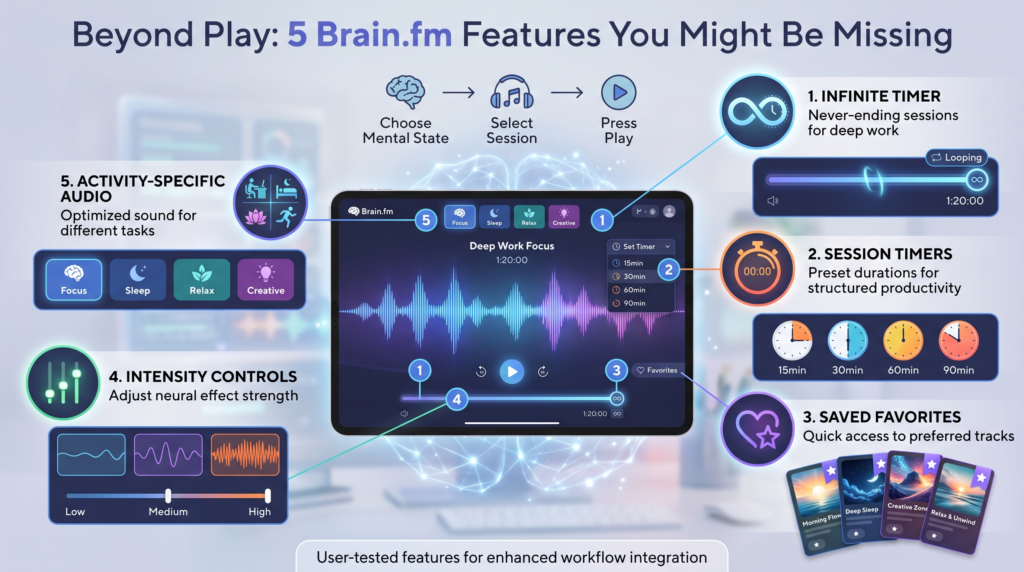
Most people probably don’t need much time to understand the basic idea behind Brain.fm. You choose a mental state, select a session, press play, and start working while the focus music plays on the background.
But after using Brain.fm myself, I noticed that some of the features that make the service more useful aren’t necessarily the ones you notice first.
The music itself is obviously the main attraction, but features such as the Infinite timer, session timers, saved favorites, intensity controls, and activity-specific audio can make the experience much easier to fit into an actual work or study routine.
I’ve used Brain.fm myself while working, so these aren’t simply features I found in a product description and decided to list. These are the features I think are worth paying attention to once you’ve moved beyond simply pressing play.
Here are five that you might be overlooking.
1. The Infinite Timer: Let Your Work Session Decide When to End
One of my favorite Brain.fm features is the Infinite timer.
Instead of telling Brain.fm that you want to work for 25, 45, or 60 minutes, Infinite simply counts upward and tracks how long you’ve been working. Brain.fm currently describes it as a count-up timer for tracking your work duration.
That sounds like a small feature, but I find it useful when I don’t want to work against a predetermined deadline or want a long time to complete a task.
Why I like using Infinite
Imagine that you’re working on something that requires concentration and you don’t know how long it will take.
You could set a 45-minute timer, but then the timer becomes another thing you’re aware of. What if you are completely focused at 45 minutes? Do you stop? Restart it? Set another session?
Infinite removes that decision.
You can start your audio, start the timer, and simply see how long the session lasts or work till you’re done.
I’ve found this particularly useful when I get into a longer stretch of work. Rather than deciding beforehand that I have to work for exactly a certain amount of time, I can just begin and see where the session takes me.
It’s also useful if you’re curious about your actual working habits.
Maybe you assume you normally work for an hour before taking a break, but Infinite shows that you regularly reach 75 or 90 minutes. Or perhaps you notice that your concentration starts falling much earlier.
The timer doesn’t tell you what your ideal work duration should be. It simply gives you a way to observe it.
When Infinite is the best choice
I’d use Infinite when:
- You don’t have a strict deadline for the session
- You’re working on a task that may take an unpredictable amount of time
- You want to track how long you’ve been working
- You don’t want an alarm interrupting your session
- You’re doing a longer deep-work session
If you’re interested in trying this workflow yourself, try Brain.fm for free and experiment with Infinite during a few different work sessions.
2. Use the Timer or Interval Mode When You Actually Need a Break
Infinite is great when you want to keep going, but sometimes structure is exactly what you need.
That’s where Brain.fm’s other timer options become useful.
Brain.fm currently offers a standard countdown Timer and an Interval option alongside Infinite. The Timer can be used to set a defined focus period, while Interval is designed around alternating work and break periods. For example, you can choose to work for 30 minutes and take a 10-minute break.
This gives you a much more structured alternative to simply pressing play and hoping you remember to take a break.
Why breaks can be useful
When you’re absorbed in a task, it’s surprisingly easy to keep going longer than intended.
You finish one section and immediately start another. Then you check the clock and realize you’ve been sitting there for much longer than expected.
A timer gives the session a clear endpoint.
You might decide to work for 45 minutes and then take a short break. Or you could use an interval structure with repeated work and rest periods.
Brain.fm has also specifically published guidance around pairing its audio with Pomodoro-style work cycles, including focus sessions and breaks.
The important part, though, is that you don’t have to follow one particular productivity method.
You can also use breaks as a reset
One approach I like is treating the break as a genuine break rather than simply switching from work to another screen.
If you’ve been working with headphones, take them off.
Stand up.
Get some water.
Walk around for a few minutes or go to the toilet.
Then return to your next session.
The idea isn’t to make every workday rigid. It makes it easier to notice when you’ve been working for a long time and give yourself a deliberate stopping point.
When to use Timer vs. Infinite
Choose Infinite when you want to work without a predetermined endpoint.
Choose Timer when you want one defined work period or if you have limited time.
Choose Interval when you want your work and breaks to follow a repeating structure.
That’s one of the nice things about having all three available: you don’t have to use the same approach every day.
Want to experiment with different session lengths? Try Brain.fm free and test Infinite against a structured Timer or Interval session.
3. Save Your Favorite Tracks Instead of Searching for Them Again
This is one of those features that becomes more useful the longer you use Brain.fm.
If you find a session or track that you particularly enjoy, you can save it so you can return to it later.
That might sound unnecessary when Brain.fm has a large selection of audio, but I actually think it solves a small problem that can otherwise become annoying.
You don’t necessarily want to spend five minutes searching for the exact audio you liked last time.
Why saving favorites matters
Brain.fm sessions aren’t necessarily like conventional three-minute songs where you quickly decide whether you like them.
Some audio is designed to run for much longer periods, which means you may only discover you really like a particular session after you’ve worked with it for 5, 10, or 15 minutes.
Once you’ve found something that fits your working style, saving it means you don’t have to go looking for it again.
I’ve found this particularly useful because the whole point of using Brain.fm for me is to reduce the amount of attention I spend managing what I’m listening to and gain more focus and motivation.
If I already know that a certain session works well for me, I’d rather save it and start working.
Brain.fm has also highlighted saving favorite tracks as a practical way to return to audio you already know you like quickly.
Don’t feel like you have to find a new track every time
You don’t necessarily need to keep searching for something new.
If you’ve found an audio session that works well for a particular type of work, there’s nothing wrong with returning to it repeatedly.
You could even build your own small collection:
- A favorite for reading
- A favorite for writing
- A favorite for creative work
- A favorite for longer sessions
- A favorite for studying
That makes the app feel less like a music library you need to browse and more like a tool you can quickly open when you need to work.
If you haven’t explored your saved favorites yet, try Brain.fm for free and spend a few sessions finding the audio you naturally want to return to.
4. Adjust the Intensity Instead of Assuming One Setting Fits Everyone
Another easy-to-overlook feature is Brain.fm’s adjustable intensity, or modulation, settings.
Brain.fm currently describes its focus audio as having customizable modulation levels, allowing users to adjust the intensity.
This is useful because your preferred listening experience may not be identical every time you work.
Start lower and experiment
Suppose you’ve never used Brain.fm before, you don’t need to choose the strongest available setting right away.
Try a lower intensity while doing something relatively straightforward.
Then experiment with a stronger setting during a task that requires more sustained attention.
I wouldn’t claim that one setting is scientifically guaranteed to work better for you than another. The most useful approach is to see what you personally prefer for different tasks.
For example, a subtle setting feels better when you’re reading, while you prefer something more noticeable when you’re doing repetitive administrative work.
Or you may discover the exact opposite.
That’s the advantage of controlling the setting rather than treating Brain.fm as one fixed audio experience.
Don’t confuse “stronger” with “better”
This is an important distinction.
If you turn the intensity up and immediately find the audio distracting, that’s useful information.
You don’t need to force yourself to use the highest setting simply because it sounds more powerful.
The purpose of customization is to find an experience that fits your task and your preferences.
This is one feature I’d encourage new users to test, rather than leaving everything at its default setting forever, because it can make a difference in your experience with brain.fm. Most of the time, my settings are at low effect because I am sensitive to sound.
5. Match the Audio to What You’re Actually Doing
The fifth feature I’d pay more attention to is Brain.fm’s activity-based approach.
Instead of treating focus as one single category, Brain.fm offers audio organized around different activities and mental states. Its current product pages include options such as Deep Work, Creativity, and Learning, alongside other states such as Relax and Sleep.
Try matching the session to the task
For a demanding task where you need to stay with one problem for a longer period, try a Deep Work-oriented session.
For studying or learning, a Learning option may be more appropriate.
For creative tasks, you could experiment with Creativity.
Again, this isn’t a guarantee that one category will objectively improve your performance. Think of it as a practical way to organize your listening and experiment with different audio for different situations.
Why this is better than endlessly browsing playlists
One thing I personally like about Brain.fm is that I don’t have to start with a blank search box and figure out what I want to listen to.
The service gives me a starting point based on what I’m trying to do.
That reduces the amount of decision-making involved.
You can still experiment with different sounds and styles, but you’re starting from the task rather than from a huge collection of unrelated songs.
Brain.fm Features at a Glance
| Features | How it works | What to use for |
| Infinite | Counts up and tracks your work duration | Open-ended work sessions |
| Timer | Sets a defined countdown | Fixed focus periods |
| Interval | Structures work and breaks | Pomodoro-style sessions |
| Saved favorites | Lets you return to audio you already like | Your go-to sessions |
| Intensity controls | Lets you adjust the audio experience | Finding your preferred level |
| Activity-based audio | Organizes audio around different activities | Matching audio to your task |
The last two aren’t technically part of the five main picks above if you’re counting the timer system as one feature category, but they’re worth mentioning because they work together with the main features to make Brain.fm more flexible.
How I’d Actually Use These Features
If I were setting up a Brain.fm work session from scratch, I wouldn’t use every feature at once.
I’d keep it simple.
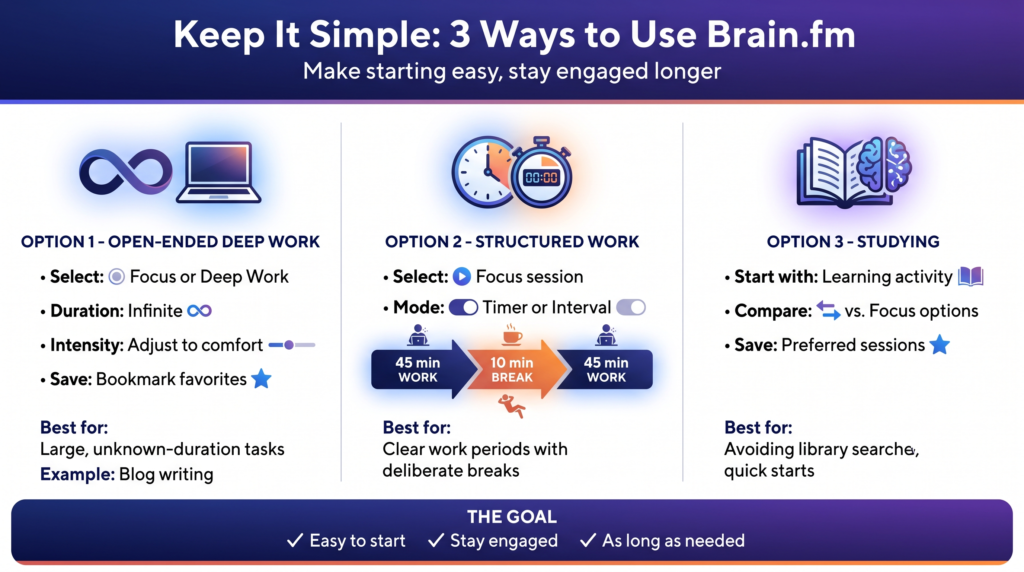
Option 1: Open-ended deep work
Choose a Focus or Deep Work session, select Infinite, adjust the intensity to a comfortable level, and start working.
If I find an audio session I particularly like, I’d save it for later.
This is the setup I’d use when I have a large task and don’t know how long it will take; for me, this is most often blog writing.
Option 2: Structured work
Choose an appropriate focus session and use Timer or Interval.
For example:
45 minutes work → 10 minute break → 45 minutes work
Give yourself a clear work period and a deliberate break.
Option 3: Studying
For studying, I’d experiment with the Learning activity first and then compare it with another Focus option.
I’d also save the sessions I prefer, so I don’t have to search through the library every time.
The goal isn’t to build a complicated productivity system.
It’s to make starting a study session as easy as possible and keep engaged with it for as long as needed.
Is Brain.fm Worth Using?
That ultimately depends on how you work.
If you regularly find yourself skipping tracks, searching for something new, forgetting to take breaks, or losing track of how long you’ve been working, these features can make Brain.fm more practical.
For me, the Infinite timer is one of the most useful because I like being able to start working without deciding exactly how long the session has to last.
The saved favorites feature is another small but useful addition. Once you’ve found audio you like, there’s little reason to keep searching.
The Timer and Interval options are useful on days when I want more structure than an open-ended session.
The adjustable intensity and activity-based options then give you more room to experiment.
Brain.fm currently offers a free trial, so you don’t necessarily have to decide whether all of these features are worth paying for before you’ve actually used them.
Try Brain.fm for free and explore the features yourself.
Final Thoughts
Brain.fm is easy to use at a basic level: choose an activity, press play, and work.
But that’s only part of the experience.
The features that I find most useful are the ones that help turn the audio into part of a larger work routine.
Infinite lets you track an open-ended session.
Timer and Interval give you structure when you want defined work periods and breaks.
Saved favorites mean you can quickly return to audio you’ve already enjoyed instead of searching again.
Intensity controls let you experiment with how noticeable the audio feels.
And activity-based audio gives you a way to match your listening choice to what you’re actually trying to accomplish.
I’d treat Brain.fm as a tool and experiment with the settings until you find a setup that fits the way you work.
That’s also why my recommendation is simple: don’t just press play once and decide whether Brain.fm is for you.
Try Infinite on one day. Use a structured timer on another. Save a few sessions you like. Experiment with the intensity. Try different activity categories.
After several sessions, you’ll have a much better idea of which features actually fit your workflow.
Try Brain.fm for free and see which features become part of your routine.
Some of the links on Best Focus Music are affiliate links. This means that if you click a link and buy something, we may earn a small commission — at no extra cost to you. We only recommend products we genuinely think are worth your time.
We are a participant in the Amazon Associates Program, an affiliate advertising program designed to provide a means for sites to earn advertising fees by linking to Amazon.com and affiliated sites. We may also work with other affiliate networks and individual brands from time to time.