Finding music for work is easy. Finding audio that you can leave playing without constantly thinking about it is harder.
A normal playlist can create a surprising number of interruptions. You skip songs. A favorite track grabs your attention. Lyrics pull you into the music. Or you spend ten minutes looking for a better playlist instead of starting your work.
That is where Brain.fm takes a different approach.
Rather than giving you an endless library of songs to browse, Brain.fm organizes its audio around what you want to do. The app currently offers activities including Deep Focus, Creativity, Learning, Light Work and Motivation, alongside categories for relaxation and sleep. Its focus streams are designed without lyrics or distracting sounds, and Brain.fm says its longer tracks are intended to avoid interruptions between songs.
But getting the most from Brain.fm is not just about pressing play.
The app gives you several settings and tools that can change the experience, including personalized recommendations, adjustable Neural Effect levels, and timers that can be adapted to your workflow. If your first session does not immediately feel perfect, that does not necessarily mean Brain.fm is not for you.
Here are seven specific ways to use focus music with Brain.fm more effectively.
1. Use the Right Brain.fm Activity Instead of Playing Deep Focus for Everything
One of the biggest mistakes new users can make is assuming that Deep Focus should be used for every task.
Brain.fm itself separates its audio into different activity types. On its focus page, the main options include:
- Deep Focus
- Creativity
- Learning
- Light Work
- Motivation
That means your first hack is simple: match the mode to the work in front of you.
Use Deep Focus for your most demanding work
This is the mode I would test when you’re doing work that genuinely requires uninterrupted attention, such as:
- writing an important article;
- working on a difficult project;
- analyzing information;
- coding;
- solving a complex problem;
- doing research.
Instead of putting it on while answering emails and doing five other things simultaneously, reserve Deep Focus for the work that deserves your best concentration.
That can also make the mode part of a useful mental routine. Over time, pressing play can become a signal that you are about to work on one specific thing.
Use Creativity when the goal is generating ideas
Not all productive work is about narrowing your attention as tightly as possible.
Brain.fm specifically offers a Creativity activity, making it a more logical option to test when you’re:
- brainstorming;
- developing article ideas;
- outlining a project;
- working on creative writing;
- looking for new solutions to a problem.
The important point is that you don’t have to search for a completely new playlist every time your task changes. Brain.fm already gives you activity-based starting points.
Don’t overcomplicate the choice
At the same time, don’t turn selecting a mode into a new distraction.
Ask yourself:
Am I trying to concentrate deeply, learn something, generate ideas, do lighter work, or get motivated to start?
Choose the closest option and begin.
2. If Brain.fm Doesn’t Feel Right Immediately, Adjust the Neural Effect
This is the most specifically useful Brain.fm hack in the entire article.
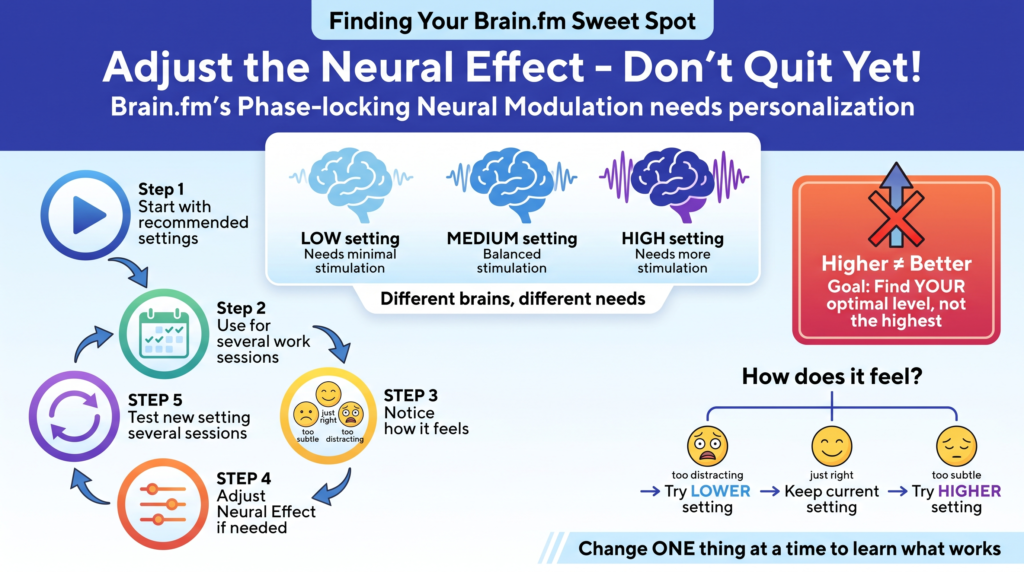
Brain.fm uses what it calls Phase-locking Neural Modulation, its patented audio technology. According to Brain.fm, the app lets users adjust modulation intensity through different Neural Effect levels. The company says these levels can be personalized because different brains may need different amounts of stimulation.
So if you try Brain.fm once and think:
This doesn’t feel quite right for me.
Don’t immediately uninstall the app.
Your settings may need adjusting
Brain.fm explains that its onboarding process can use a short quiz to help personalize the music and determine an appropriate level of stimulation. Its Dutch site specifically says that different people need different amounts of help to get started and stay focused.
That makes experimentation part of using the app.
A good approach is:
- Start with Brain.fm’s recommended settings.
- Use them for a few similar work sessions.
- Notice whether the audio feels too subtle, distracting or comfortable.
- Adjust the Neural Effect if necessary.
- Test the new setting for several sessions before judging it.
Higher isn’t automatically better
This is important.
It may be tempting to think that High Neural Effect = maximum productivity, but Brain.fm itself emphasizes personalization rather than presenting one intensity as ideal for everyone. Its FAQ explains that some people may need only a small amount of stimulation while others need more.
So the goal is not to find the strongest possible setting.
The goal is to find the level that best supports your ability to stay with the task.
If you find yourself noticing the audio too much, experiment with a different setting. If the effect feels too subtle, try a higher intensity.
Change one thing at a time so you can actually learn what works.
Try it yourself: Start Brain.fm and personalize your focus settings
Advanced Strategies
3. Stop Searching for Music Every Time You Sit Down to Work
This sounds simple, but it highlights one of the biggest advantages of Brain. fm’s design.fm’s design.
Brain.fm describes its focus experience as providing seamless, personalized music streams, so users do not have to keep searching for something to play. The platform also highlights extra-long tracks designed to reduce interruptions and says its focus audio avoids lyrics and other distracting sounds.
You can turn that into a practical concentration hack.
Use the audio as a work trigger
Personally, I think this is one of the strongest ways to use the app.
Try using the same Brain.fm setup only when you are actually going to work.
For example:
Open your document → turn off unnecessary notifications → put on your Deep Focus session → start writing.
Eventually, the routine itself may become useful because there is less friction between sitting down and beginning.
The app doesn’t have to “force” you to focus. It simply becomes part of a consistent environment associated with working.
4. Use Brain.fm’s Three Timer Types for Different Situations
Another feature that deserves more attention is the timer system.
Brain.fm currently describes three timer options:
- Infinite: counts upward to track how long you’ve been working;
- Timer: counts down for a set amount of time;
- Interval: alternates between work and breaks using adjustable intervals.
Instead of using one timer for everything, choose the one that solves your current problem.
Hack #1: Use Infinite when you don’t want a deadline hanging over you
The Infinite timer is useful for open-ended tasks.
You may be writing an article and don’t know whether it will take 40 minutes or two hours. Instead of repeatedly deciding whether to extend your timer, let it count upward.
This gives you a simple record of how long you’ve actually been working.
It can also help you discover your natural focus patterns.
You might notice that you usually start losing concentration after 55 minutes. Or you may discover that once you get through the first 15 minutes, you can work comfortably for much longer.
Hack #2: Use a countdown Timer when starting is the problem
If you’re procrastinating, a clear finish line can help.
Try telling yourself:
I only need to work until this Brain.fm session ends.
That makes a difficult task feel more contained.
You could start with:
- 25 minutes;
- 45 minutes;
- 60 minutes.
The best length depends on you and the task. The goal isn’t to select the longest session. It is to choose a session you can realistically begin and complete.
Hack #3: Use Interval when you need structure
The Interval timer alternates work and breaks. This is particularly useful if you tend to either:
- take breaks too frequently; or
- forget to take them at all.
For example, you might build a simple routine around:
Work → break → work → break
The advantage is that you don’t have to keep checking the clock yourself.
5. Don’t Assume Every Sound Has to Be the Same
Brain.fm has over a 1000+ different tracks. Its library includes hours of music, focus music, and natural soundscapes.
That gives you room to experiment without abandoning the Brain.fm system entirely.
This matters if one particular sound starts feeling repetitive.
Your first instinct might be to return to your usual playlists. Instead, try changing the musical environment while keeping the same activity and overall workflow.
Change the sound, not your entire system
For example, if your Deep Focus setup has worked for writing but you are becoming overly familiar with the sound, experiment with another Brain.fm stream or soundscape.
Familiarity can be useful — until it becomes distracting
There is no reason to chase novelty constantly.
If a particular sound helps you work, use it repeatedly.
But if you begin anticipating sections of the music, noticing specific changes or becoming bored with it, test another option.
The point of using the app’s large library is not to spend all day browsing. It’s to give yourself alternatives when your current setup no longer feels neutral enough to support concentration.
6. Pair Brain.fm With a Distraction-Free Setup
Brain.fm itself emphasizes a distraction-free approach. Its focus page highlights one-click access, long-form streams and the absence of lyrics or distracting sounds.
But the app cannot remove distractions that exist elsewhere.
If your phone lights up every two minutes, your email is open in another tab and you haven’t decided what you need to do, audio alone won’t fix the problem.
Your physical environment matters too. If you’re working in a noisy office, café, or shared home, a good pair of noise-cancelling headphones can help reduce the background noise that competes for your attention. If you’re considering ANC for your work setup, our guide to how noise-cancelling headphones actually work explains what the technology can — and can’t — block. Besides, it is a nice way to listen to your music or brain.fm.
Try a Brain.fm focus session without searching through another playlist
Common Pitfalls
7. Don’t Judge Brain.fm by Whether It “Feels” Dramatic
Brain.fm’s Dutch website says its technology can stimulate coordinated neural activity within five minutes and describes its technology as research-backed. It also points users toward peer-reviewed research and its science resources.
But that does not mean every user will experience an obvious sensation the moment they press play.
In fact, I think this is where people can judge an app like Brain.fm unfairly.
You may expect a sudden feeling of:
Wow, I am now completely focused.
A more useful test is what happens to your behavior.
After a session, ask:
- Did I start the task faster?
- How often did I switch to something unrelated?
- Did I spend time skipping or searching for music?
- Did I stay with the task until the timer ended?
- Did the audio become distracting?
- Would I use the same setup again?
Those answers tell you more about your personal experience than whether the music produced an immediate dramatic feeling.
Run a simple comparison
Try comparing Brain.fm with your normal setup.
Session A: Your usual playlist or silence.
Session B: Brain.fm.
Try to keep the following similar:
- type of task;
- approximate time of day;
- session length;
- work environment.
Then compare how the sessions actually went.
If you want to know more specific information about brain.fm we also have a brain.fm review article.
Expert Advice: Let Brain.fm Personalization Do Some of the Work
One of the main reasons I like using Brain.fm is that the platform is built around personalization.
The app can use a short onboarding quiz to adapt the experience to the user, while different Neural Effect levels provide different amounts of stimulation. The company also offers activity-based modes instead of treating every type of work as identical.
That leads to my main recommendation:
Don’t give up after one default session
If you try Deep Focus once and don’t love it, test:
- another activity when your task is different;
- another Neural Effect level;
- a different session length;
- another stream or soundscape.
But don’t change everything simultaneously.
A useful progression would be:
First: Find the right activity.
Then: Find a comfortable Neural Effect level.
Then: Find a timer style that fits your workflow.
Finally: Experiment with different music and soundscapes.
This makes Brain.fm’s personalization useful without turning it into another thing you constantly have to optimize.
Conclusion: The Best Brain.fm Hack Is Using the App for the Way You Actually Work
Brain.fm offers more than a single type of concentration audio.
You can choose between activities such as Deep Focus, Creativity, Learning, Light Work, and Motivation. You can personalize Neural Effect levels. You can choose from thousands of hours of music and natural soundscapes, including plenty of focus music. You can also use Infinite, countdown, or Interval timers, depending on how you prefer to structure your work.
That is why the seven hacks above all come back to one idea: don’t use Brain.fm passively.
Use Deep Focus for genuinely demanding work. Try Creativity when you need ideas rather than narrow concentration. Adjust the Neural Effect instead of assuming the default is perfect. Use the right timer for the problem you’re trying to solve. Reduce the time you spend making unnecessary music decisions.
Most importantly, give a setup enough time to evaluate it properly.
The best configuration isn’t necessarily the one with the highest intensity or longest timer. It’s the one that helps you sit down, start your task, and stay with it without the audio becoming another distraction.
If you want to test the difference for yourself, use several comparable work sessions rather than judging Brain.fm after one listen.
Ready to experiment? Try Brain.fm and test your own personalized focus setup
Some of the links on Best Focus Music are affiliate links. This means that if you click a link and buy something, we may earn a small commission — at no extra cost to you. We only recommend products we genuinely think are worth your time.
We are a participant in the Amazon Associates Program, an affiliate advertising program designed to provide a means for sites to earn advertising fees by linking to Amazon.com and affiliated sites. We may also work with other affiliate networks and individual brands from time to time.