
Regular playlists aren’t built for coding or programming. Here’s why developers keep switching to Brain.fm, and whether it’s worth the subscription.
Why Coding Needs Different Audio
With coding, you’re holding several things in your head at once: variable names, logic branches, the edge case you haven’t handled yet.
Open offices don’t help. Slack pings, half-heard conversations, a chair squeaking two desks over — it all chips away at your concentration.
Even your own music can work against you. A surprise chorus, or a song you can’t help singing along to, pulls your attention off the problem. That’s why more programmers are looking for focus music instead of a regular playlist.
How We Judged Brain.fm
We looked at what actually matters three hours into a coding session:
- Does it genuinely help you stay locked in or not?
- Is the listening experience consistent from start to finish?
- How much effort does it take to just hit play?
- Do you have to search for the right playlist?
- Can sessions be tailored to what you’re doing?
- Is the subscription worth the price?
- Does it work equally well on desktop and mobile?
- What does it feel like to actually use it, not just try it once?
None of that is about entertainment. It’s about whether the tool holds up once the novelty wears off.
1. Built for Deep Work, Not Browsing
Spotify and Apple Music are built around discovery — new artists, new playlists, endless scrolling. Brain.fm works differently. Every session has one job: Focus, Relax, or Sleep.
For programmers, that means no time lost hunting for the “right” playlist before opening your editor. You pick Focus, and the audio stays steady for the whole session instead of jumping between genres or dropping into lyrics halfway through.
Why this matters if you code for a living:
- No lyrics competing with the code you’re reading
- No jarring genre switches mid-session
- Sessions that run continuously, not a looping ten-song playlist
- Built around sustained concentration, not discovery
2. It Takes the Edge Off Everyday Noise
Brain.fm can’t silence an open office. But combined with noise-cancelling headphones, many users say unpredictable background noise — footsteps, chatter, a phone buzzing — becomes far less distracting.
The goal isn’t total silence. It’s making background noise fade, which is where it belongs when you’re working through complex logic.
That’s useful whether you’re in a busy café, a coworking space, or a home office that’s never quite as quiet as you’d like.
3. A Simple Interface
Brain.fm keeps things stripped down. Just pick a goal. They offer four modes:
- Focus
- Relax
- Sleep
- Meditation
Choose a session length, hit play, and start coding and working. That’s the setup.
For developers, less time configuring audio means more time writing code. Switching from a morning coding sprint to an evening wind-down session takes seconds, not a scroll through saved playlists.
4. It Holds Up During Long Sessions
Anyone who’s coded for four or five hours straight knows what happens to a normal playlist by hour three. Songs repeat. The mood swings from mellow to hyped and back. Eventually you tune it out or turn it off.
Brain.fm avoids this by keeping the listening experience steady throughout. Many developers pair it with:
- Pomodoro sessions: a work session no longer than 25 minutes.
- Time blocking: taking breaks between working hours.
- Deep work blocks: special blocks without distractions.
- Sprint planning: a work session with a main goal you want to complete.
The predictable, science-based music reinforces whatever structure you’re already using, instead of working against it.
5. You Can Test It First
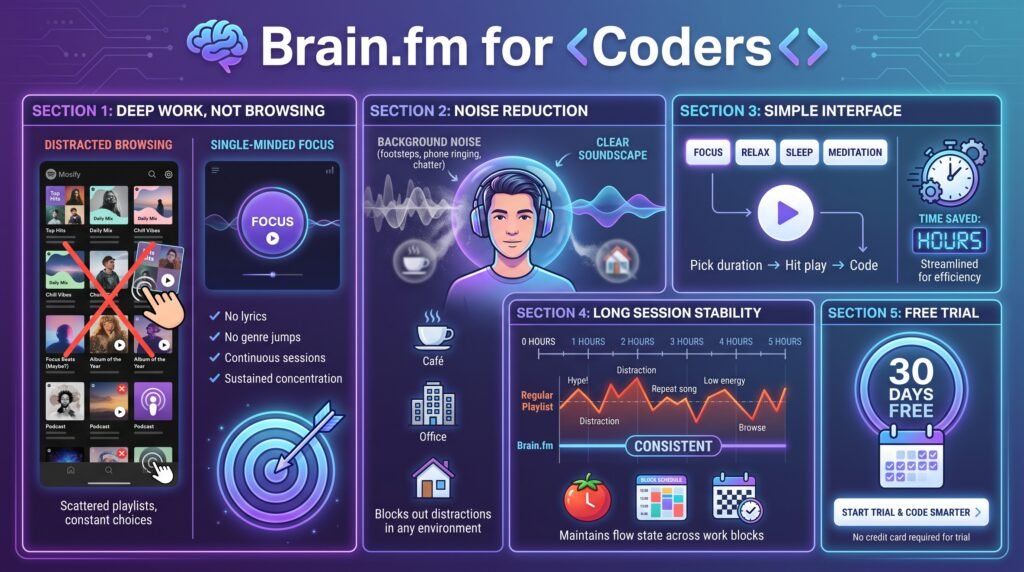
Brain.fm offers a 30-day free trial, long enough to run it through several real coding sessions before committing.
Everyone responds to audio like this differently. Some people notice a change almost immediately; others need a week or two. Either way, testing it beats guessing.
If you want to know if it improves your focus, you can try it here, or you can read our brain.fm review first.
What’s Actually Happening in the Audio
Brain.fm’s tracks aren’t just ambient music with the vocals stripped out. The company layers rhythmic pulses under the music, built around research into how the brain responds to certain frequencies during sustained attention tasks.
You won’t consciously notice the pulses while you work. That’s the point — they sit under the surface of the track instead of becoming another thing competing for your attention.
This is a meaningful difference from a “focus” playlist on a regular streaming service, which is usually just a collection of calm-sounding instrumental songs with no underlying structure tying them together. Brain.fm’s approach is closer to a tool than a mood.
What It Costs
Brain.fm runs on a subscription, with monthly and annual pricing options. The annual plan works out cheaper per month if you’re planning to use it regularly. You can try their app out with a 30-day free trial.
Given the 30-day free trial, there’s little reason to commit to a paid plan before running it through a real workweek. A few days of casual testing won’t tell you much — a full sprint or project cycle gives a far more honest picture of whether it actually helps, especially if your work involves a mix of deep focus tasks and lighter admin work throughout the day.
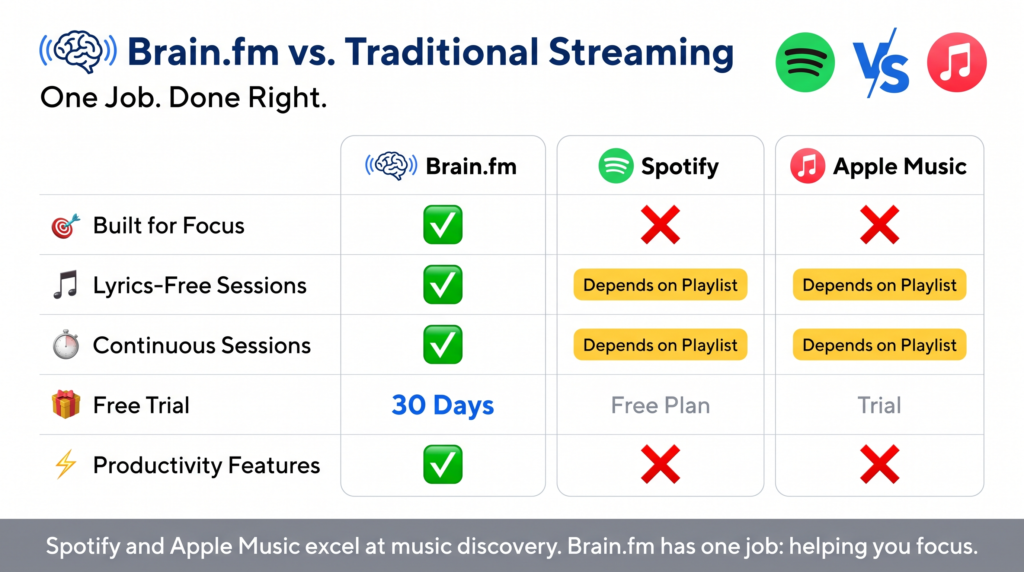
Brain.fm vs. Traditional Streaming
| Brain.fm | Spotify | Apple Music | |
| Built for focus | ✅ | ❌ | ❌ |
| Lyrics-free sessions | ✅ | Depends on playlist | Depends on playlist |
| Continuous sessions | ✅ | Depends on playlist | Depends on playlist |
| Free trial | ✅ 30 days | Free plan | Trial |
| Productivity features | ✅ | ❌ | ❌ |
Spotify and Apple Music are still excellent at what they’re built for: discovering and enjoying music. Brain.fm aims to keep you focused and concentrated.
Is It for Every Programmer? No.
Some developers work best in dead silence. Others code to jazz, lo-fi, or death metal, and that works fine for them.
Brain.fm isn’t trying to replace how everyone listens to music at work. It’s built for people who’ve already tried the usual playlists and still end up distracted.
Worth trying if you regularly deal with:
- Trouble staying locked into a task of coding.
- Getting pulled out of flow by distractions like conversations or sound from outside your house.
- Mental fatigue creeping in before lunch.
- Not finding background audio that consistently works, every time.
Buying Guide
Do you mostly work somewhere with a lot of noise? Brain.fm paired with noise-cancelling headphones can genuinely change how your workday feels and how productive you are. We have an article about if Noise-Cancelling Headphones Actually Work.
Do lyrics throw you off? Instrumental audio is easier to code to since it doesn’t compete with the words you’re reading and writing.
Are you already happy with Spotify? If your current setup works, there’s no reason to switch. If you’ve gone through dozens of playlists without success and you still haven’t more focus, then it’s worth testing something built specifically for deep work.
Do your sessions run long? The longer you’re at it, the more a consistent, non-repetitive soundtrack pays off. This is where Brain.fm separates itself from a regular streaming playlist.
Final Thoughts
Long coding sessions live and die on concentration, and small distractions add up fast. No app replaces good habits, but the right background audio makes it easier to stick to a focus music routine.
Brain.fm isn’t trying to entertain you; it’s trying to keep you working, with science-based focus music. Between the simple interface, steady sessions, and a 30-day free trial, it’s worth testing during your next long coding block.
Ready to find out if it works for you? Start Brain.fm’s 30-day free trial and run it during your next session.
Still comparing options? Our complete Brain.fm review covers pricing, features, and how it stacks up against other focus music tools.
FAQ
Is Spotify for coding or Brain.fm better? For music discovery, Spotify wins easily. For staying locked into a task, Brain.fm’s purpose-built sessions are usually more helpful.
Does focus music really improve focus? Some people notice a real difference in how long they stay on task; others just appreciate consistent, lyric-free background audio.
Is it beginner-friendly? Yes. Whether you’re three weeks into learning Python or a decade into your career, the app takes about thirty seconds to figure out.
Do I need headphones? Speakers work fine in a quiet room. Headphones give a more immersive experience anywhere with background noise you can’t control.
Is there a free version? Brain.fm doesn’t offer a permanent free tier, but the 30-day trial gives full access to test it properly before paying anything.
Can I use it while pair programming or on calls? It’s built for solo focus sessions, not background audio during calls. Most developers save it for heads-down work — writing, debugging, or reviewing code alone — rather than meetings or collaborative sessions where you need to actually hear other people.
Some of the links on Best Focus Music are affiliate links. This means that if you click a link and buy something, we may earn a small commission — at no extra cost to you. We only recommend products we genuinely think are worth your time.
We are a participant in the Amazon Associates Program, an affiliate advertising program designed to provide a means for sites to earn advertising fees by linking to Amazon.com and affiliated sites. We may also work with other affiliate networks and individual brands from time to time.