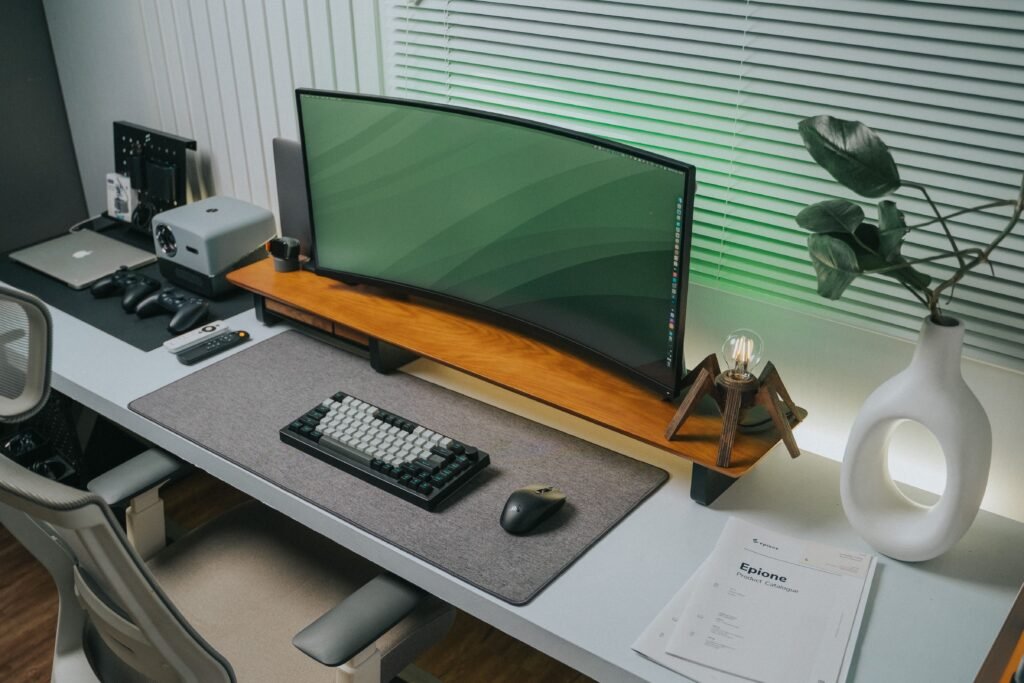
A good deep work session does not require an expensive office makeover. Often, a few practical desk accessories can make your workspace easier to use, reduce small distractions, and help you create a more consistent environment for focused work.
In this guide, we look at 10 desk accessories for deep work that can make sense for students, remote workers, writers, programmers, and anyone who spends long periods working at a desk.
The goal is not to buy everything. Instead, identify the part of your workspace that creates the most friction and upgrade that first! Personally I started with desk organizers.
Quick Picks: Best Desk Accessories for Deep Work
| Accessory | Best for |
| Laptop stand | Raising your laptop screen |
| Monitor light bar | Focused work in the evening |
| Monitor arm | Creating more desk space |
| Desk mat | A cleaner, defined workspace |
| Cable management | Reducing visual clutter |
| Headphone stand | Keeping headphones accessible |
| Ergonomic footrest | Supporting a more comfortable desk setup |
| Wrist rest | Keyboard and mouse users |
| Desk organizer | Keeping essential items within reach |
| USB-C hub | Simplifying a laptop-based workspace |
1. Laptop Stand
If you work primarily from a laptop, a laptop stand is one of the simplest upgrades to consider.
A laptop placed directly on a desk can force you to look downward for long periods. Raising the screen can make it easier to position your display at a more comfortable height, particularly when you use an external keyboard and mouse.
A good laptop stand does not need to be complicated. Look for a stable design, adjustable height or angle if you need flexibility, and compatibility with the size and weight of your laptop.
For students or people who regularly move between different workspaces, a foldable stand can be particularly useful.
What to look for:
- Adjustable height or angle
- Stable base
- Anti-slip surfaces
- Compatibility regarding your laptop size
- Foldable design if portability matters
Best for: laptop users, students, remote workers, and small desks.
If you are creating a complete workstation, a laptop stand can also work alongside an external monitor. That allows your laptop to become a secondary screen rather than the only screen on your desk.
2. Monitor Light Bar
A monitor light bar is another useful accessory if you regularly work in the evening or in a room where your desk lighting is not ideal.
Instead of taking up valuable desk space like a traditional lamp, a monitor light bar sits on top of your display and directs light toward the desk.
One well-known example is the BenQ ScreenBar range. Monitor light bars are also increasingly common in modern desk setups, with current guides frequently including them alongside laptop stands, desk mats and cable management accessories.
The purpose is simpler: create a workspace with lighting that is comfortable and practical for the conditions in which you work.
Look for:
- Controllable brightness
- Adjustable color temperature
- A design that fits your monitor
- Low desk footprint
- Easy controls
Best for: evening work, students, remote workers, and minimalist desks.
Browse monitor light bars on Amazon US Or,
3. Monitor Arm
If you use a desktop monitor, a monitor arm can completely change how much space is available on your desk.
A standard monitor stand occupies part of the surface area. A monitor arm moves much of that setup away from the desk and allows you to adjust the position of the screen.
It can also be useful if you regularly switch between sitting and standing or want to use two monitors.
You do not need one simply because it looks good in a desk setup. The main reason to consider a monitor arm is flexibility.
A monitor arm can be useful if you want to:
- Free up desk space
- Adjust monitor height
- Change the viewing angle
- Use multiple monitors
- Create a cleaner workspace
The Ergotron LX is one example of a well-established monitor-arm product, while there are many less expensive alternatives available.
Best for: desktop users, dual-monitor setups, and people who want more desk space.
4. Desk Mat
A desk mat is a relatively inexpensive way to create a defined working area.
Instead of having your keyboard, mouse, notebook and other items spread across a large desk surface, a large mat creates a visual boundary for the main working area.
It can also protect the desk surface and provide a consistent surface underneath a keyboard and mouse.
However, you do not need an expensive desk mat. The important things to consider are size, material, surface feel and whether it stays in place.
Look for:
- A size appropriate for your desk
- Non-slip backing
- Easy-to-clean material
- A smooth surface for your mouse
- Durable edges
Best for: minimalist setups, students and anyone who wants a more organized workspace.
We picked you an affordable desk mat, which is also a best seller.
5. Cable Management
Cable management is not the most exciting desk upgrade, but it can make a noticeable difference to how organized your workspace feels.
A charging cable, monitor cable, headphone cable and several USB cables can quickly turn into a collection of wires across the back and front of a desk.
You do not need an expensive cable-management system. Cable clips, sleeves, under-desk trays and simple organizers can be enough.
Your goal should be to keep cables from becoming something you constantly notice, move, or untangle. So you can stay focused on what you want to do.
Useful cable-management products include:
- Adhesive cable clips
- Cable sleeves
- Under-desk cable trays
- Velcro cable ties
- Cable boxes
- USB cable organizers
Best for: multi-device setups and desks with lots of cables. So looking for better cable-management?
6. Headphone Stand
If focus music is part of your work routine, a headphone stand is a surprisingly logical addition to your desk.
Instead of leaving your headphones on the desk, hanging them from a monitor or placing them somewhere else after a session, a headphone stand gives them a consistent place.
This is particularly useful if you use over-ear headphones such as the Sony WH-1000XM5 or Bose QuietComfort Ultra 2.
You can read our individual headphone guides before deciding which model fits your needs:
- Sony WH-1000XM5 review
- Bose QuietComfort Ultra (2gen) review
- Best Noise Cancelling Headphones for Office Work
A simple headphone stand does not need to be expensive. The main things to check are stability, size and whether the stand can comfortably support your headphones.
Best for: people who regularly use headphones for focus music, studying or remote work.
7. Ergonomic Footrest
A footrest is another small accessory that can make sense for people who spend several hours at a desk.
Not everyone needs one. If your feet already rest comfortably on the floor and your chair and desk are properly adjusted, there may be little reason to add another accessory.
But if your desk or chair combination makes it difficult to find a comfortable position, an adjustable footrest can be worth considering.
Look for a model that is stable and allows you to position your feet comfortably rather than one that simply looks good underneath the desk.
Best for: long work sessions and people who want to make their seated workspace more comfortable.
8. Keyboard or Wrist Rest
If you spend much of your day typing, a wrist rest can be a simple addition to your desk.
The purpose is not to magically make you more productive. Instead, it can help create a more comfortable keyboard setup for people who prefer using one.
The right option depends heavily on your keyboard and personal preference. Some people prefer memory foam, while others prefer a firmer surface.
Do not buy one simply because it is marketed as an ergonomic product. Check the dimensions and make sure it matches your keyboard.
Best for: writers, programmers, students and anyone who types for long periods.
9. Desk Organizer
A desk organizer can be useful if your workspace tends to collect notebooks, pens, charging cables and other small items.
The key is to avoid turning the organizer itself into another source of clutter.
Only keep things you regularly use within reach. Less frequently used items can be stored elsewhere.
For a deep work setup, your immediate workspace should ideally contain the things you actually need for the task in front of you.
A simple organizer can therefore be more useful than a large collection of desk accessories.
Best for: students, writers, home offices and people with cluttered desks.
10. USB-C Hub or Dock
Modern laptops often have relatively few ports, which can become inconvenient when you connect a monitor, keyboard, mouse, external drive and other accessories.
A USB-C hub can consolidate those connections into one device.
This is especially useful for people who move between a laptop-only setup and a more permanent home office.
Before buying one, check exactly which ports you need. USB-C hubs vary considerably. Some offer HDMI, USB-A, Ethernet, SD card slots and power delivery, while simpler models may only provide a few additional ports.
Look for:
- HDMI or DisplayPort if you use an external monitor
- USB-A ports for older accessories
- USB-C power delivery
- Ethernet if required
- SD/microSD slots if you use them
Best for: laptop-based home offices and hybrid work setups.
How to Build a Focused Desk Without Buying Everything
If you want to build a focused desk, you may feel like you need to buy a lot.
But a better approach is to identify the biggest source of friction in your present setup. After that, you can go back through the list and browse for what you need exactly.
- If your laptop setup is uncomfortable, then use a laptop stand or an external keyboard and mouse.
- If your desk feels cluttered, then start with a cable management, a desk organizer or a desk mat.
- If you work at night, then consider a monitor light bar or an extra light.
- If you use headphones every day, then consider a headphone stand, so you have a dedicated place for your headphones.
- If you use multiple monitors, use a monitor arm or cable management.
This approach is more practical than buying ten accessories at once, besides, it is also cheaper. you do not need everything at once to gain more focus and concentration.
A Simple Deep Work Desk Setup
You can also combine a few of these accessories into a relatively simple focus-oriented setup.
🎧 Audio
Use headphones if you prefer working with focus music or need to reduce distracting environmental sounds.
If you are considering headphones specifically for work and studying, see our guides to the Sony WH-1000XM5 and Bose QuietComfort Ultra 2gen.
If you are interested in focus music or are already using it, you could check out brain. fm review, which is a focus music app. Or look at our best focus music apps of 2026.
⏱️ Work sessions
Once your desk is ready, use a structured work session rather than continuing to reorganize your workspace.
You can start a focused session with our Free Deep Work Session Timer.
And if you want music to accompany your session, try our Music Finder to find a focus audio option that matches your preferences.
Do Desk Accessories Actually Improve Focus?
Desk accessories should not be viewed as a shortcut to better concentration.
A new desk mat will not suddenly make a difficult task easier, and a laptop stand will not eliminate every distraction.
What accessories can do is remove small sources of friction from your workspace.
A cable that constantly gets in the way, an awkward laptop position, poor desk lighting or headphones with nowhere to go are all relatively small problems. But when you spend several hours at a desk, reducing unnecessary friction can make your workspace easier to use.
The goal should therefore be simple:
Build a workspace that makes it easier to start and continue focused work.
You do not need the most expensive desk setup. You need a setup that works for the way you actually work.
Final Recommendations
If you only want to buy a few accessories, start with the problem rather than the product.
For laptop users:
A good laptop stand is a practical starting point.
For evening workers:
Consider a monitor light bar.
For cluttered desks:
Start with cable management and a simple organizer.
For headphone users:
A headphone stand keeps your focus setup organized.
For multi-monitor users:
A monitor arm can free up useful desk space.
For long desk sessions:
Consider accessories such as a footrest if they address a specific comfort issue.
The best setup removes distractions and makes your work easier without becoming another project to optimize.
Build Your Focus Setup
Once your workspace is ready, you can use the rest of BestFocusMusic to create a complete focus routine:
🎵 Find focus music: Use our Music Finder
⏱️ Start a work session: Try the Deep Work Session Timer
📅 Organize your workday: Use the Remote Work Focus Planner
🎧 Choose headphones: Explore our headphone guides and reviews
The objective is not to create the perfect desk. It is to create a workspace that helps you spend less time thinking about your setup and more time doing the work.
Some of the links on Best Focus Music are affiliate links. This means that if you click a link and buy something, we may earn a small commission — at no extra cost to you. We only recommend products we genuinely think are worth your time.
We are a participant in the Amazon Associates Program, an affiliate advertising program designed to provide a means for sites to earn advertising fees by linking to Amazon.com and affiliated sites. We may also work with other affiliate networks and individual brands from time to time.