You may sit down with a clear intention to write, only to check your phone ten minutes later. Or you may spend half an hour changing playlists because the music is too repetitive, too familiar, or too distracting. Lyrics can pull your attention toward the song, while silence can make every conversation, keyboard sound, or notification feel more noticeable.
Brain.fm is one option writers can experiment with when building a more consistent writing environment. Rather than functioning like a traditional music streaming service, Brain.fm offers audio designed around different activities, including Deep Work and Creativity. The company says its approach is based on research in functional music and neuromodulation.
The more useful question is: Can you use Brain.fm as part of a writing routine that makes it easier for you to start, stay engaged, and protect your creative time?
Let’s look at how.
Why Writers Often Struggle to Maintain Creative Flow
The challenge for a writer is maintaining enough uninterrupted attention to move beyond the first few minutes of resistance. A writer may need time to:
- develop an idea;
- organize a rough outline;
- write a first draft;
- solve a difficult paragraph;
- Make no constant attempts to second-guess each sentence.
Frequent interruptions can make this process more difficult; each time you switch from writing to checking a message, opening another tab, or changing your music, you break up the work session you were trying to carry out.
The first few minutes of a writing session can be especially vulnerable to distraction. If something repeatedly pulls you away, part of the session can be spent trying to regain your focus.
One reason some writers make use of a constant audio environment is this.
Focus music influences your brain activity, which can help you stay more focused. Also the music should become part of a routine sequence in which you play the audio, open your document, and then start writing.
Essential Tips for Writers Using Brain.fm
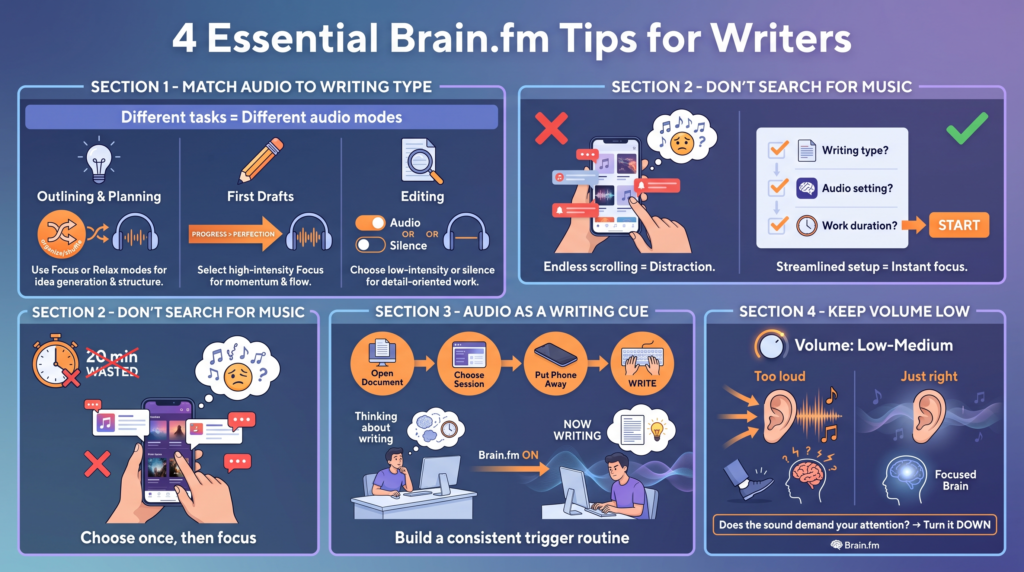
1. Match the Audio to the Type of Writing You’re Doing
Writing tasks do not all call for the same kind of mental approach.
Writing a first draft is quite different from editing a technical article, and brainstorming ideas requires yet another approach. Brain.fm currently offers activity-based modes such as Deep Work and Creativity, which let users choose the audio based on what they are trying to do.
A practical approach is to conduct experiments rather than assuming that a single setting will work for all tasks.
For example:
For outlining and planning
Try a session when you need to organize ideas without becoming overly absorbed in the audio. This stage often involves thinking broadly, moving ideas around, and deciding what the piece should become.
For first drafts
It is advantageous for a great many writers to avoid making decisions unrelated to the act of writing; rather than spending ten minutes looking for a different playlist, select an audio session and start.
Progress is generally the aim of a first draft rather than perfection.
For editing
Care must be taken with each sentence when editing; you may end up preferring a different audio setting, or find that silence is better at this stage.
One has no reason to compel oneself to use the same sound at each stage of the writing process.
If you want to experiment with activity-based audio for different writing tasks, you can try Brain.fm for free and test which sessions work best with your personal writing process.
2. Don’t Spend Your Writing Session Searching for Music
A distraction that is often neglected is the search for the “perfect” soundtrack.
The process begins by searching for some background music, after which you skip three songs; a familiar piece then comes up and reminds you of a certain thing; you then open up another playlist and, twenty minutes later, haven’t written a single word.
A less complicated system could eliminate this unnecessary friction.
Before your writing session begins, decide:
- What kind of writing you are engaged in.
- The audio setting you would like to test.
- For how long do you intend to work?
Then start.
The value that Brain.fm offers to writers might be due to this simplicity; rather than having to constantly manage a playlist, you can choose an activity and then let the session continue as you concentrate on your work. The service is available on the web, on iOS, on Android, and on desktop, as stated on its official website.
Certainly, you shouldn’t always change the audio. If you find that it’s becoming distracting, then make the necessary adjustment. But do try to avoid turning the choice of music into a form of procrastination.
3. Use Audio as a Cue to Start Writing
A really useful way to use Brain.fm is to link it to a specific writing routine.
For example:
Open document → choose session → put phone away → write.
Eventually, the same sequence could make the process of moving into your work easier.
No assertion is needed regarding the audio itself giving rise to creativity; it is enough for a regular routine to eliminate the need to make decisions at the start of a session.
You will know what happens next.
You write.
This is particularly useful when working from home and having difficulty in switching between personal time and creative work; by beginning your writing session in the same way at the start of your writing block, you establish a clear distinction between ‘I’m thinking about writing’ and ‘I’m now writing.’
4. Keep the Volume Low Enough to Forget About It
If you find that the music is constantly noticeable, tap your foot with each change, or are distracted by the sound, then the music might be too obvious for the activity you are engaged in.
The appropriate volume varies from person to person, but it would be a good idea for many writers to try a level of background audio that supports the environment without directly competing with their thinking.
It is especially important when language processing is involved in writing.
If you find that you are concentrating on what you are hearing, then reduce the volume before concluding that the entire audio method is not suitable for you.
A good test is simple:
If the sound starts asking for your attention, then it may not be supporting your writing session.
Advanced Strategies for Longer Writing Sessions
5. Separate Creative Writing From Administrative Work
It is a common error to consider every hour spent at your computer equally important.
Checking your email counts as work, responding to comments counts as work, and formatting a document counts as work too.
But those activities do not necessarily require the same uninterrupted attention as developing an article, writing a chapter, or creating original content.
Try identifying your highest-value creative task before starting the day.
For example:
- drafting a new article;
- writing a difficult introduction;
- developing a chapter;
- creating an outline for an important project;
- revising a major piece of work.
Then protect a dedicated session for that task.
Brain.fm may be most useful when you give the session a clear purpose, rather than playing it in the background all day while switching continuously between unrelated activities.
If traditional playlists keep becoming repetitive or distracting, test a Brain.fm writing session here, during one of your most important creative blocks, and compare it with your usual setup.
6. Use Time Blocks Instead of Waiting for Inspiration
Choose a realistic session length. A 25-, 45-, 60-, or 90-minute block can work depending on the task and your ability to maintain attention. The goal isn’t to choose the longest session, but to choose a block you can realistically complete.
Once the session starts, avoid judging the quality of every sentence. Give yourself permission to write badly before deciding whether the work needs revision.
Your first responsibility during a first-draft session is usually to produce material you can improve later.
7. Test Brain.fm Like a Personal Experiment
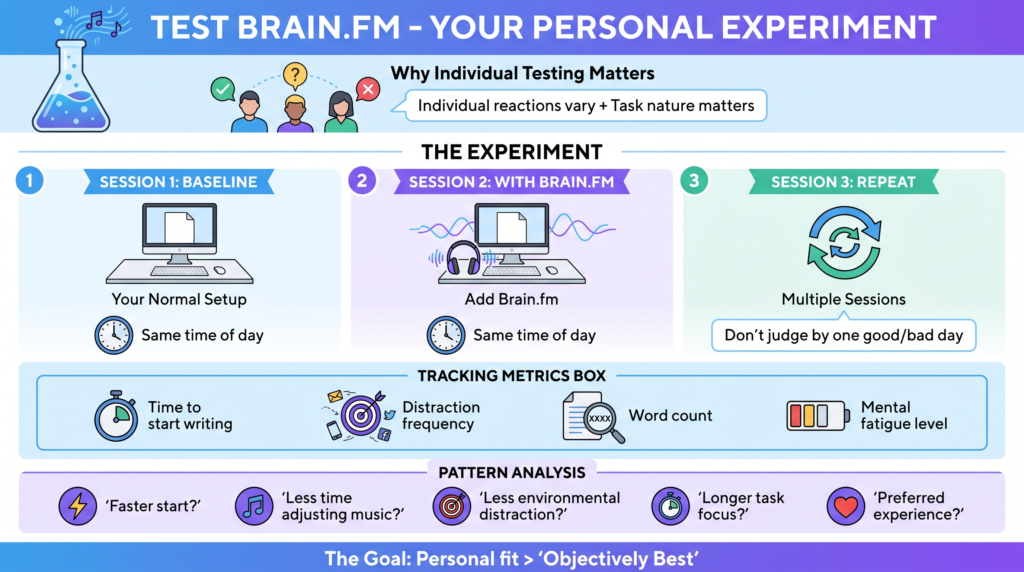
Just because an app works for one writer does not mean that it works in general.
It has been suggested that individual reactions to background music can vary and that the nature of the task is important. Moreover, various studies have looked into how specific musical characteristics, such as amplitude modulation, might affect sustained attention in different ways among listeners.
Carry out a simple experiment over a number of writing sessions.
Session 1: Your normal setup
Write without changing anything.
Track:
- how long it took to start;
- how often you became distracted;
- approximate word count;
- whether you felt mentally tired.
Session 2: Brain.fm with the same type of task
Make sure that all the other conditions are as similar as possible.
If possible, use the same general time of day.
Session 3: Repeat
You shouldn’t evaluate the results by reference to one particularly good or bad day.
Following a number of sessions, search for any patterns.
Did you:
- start writing faster?
- spend less time changing music?
- feel less distracted by your environment?
- stay with the same task longer?
- simply prefer the experience?
It is more useful to ask those questions than to ask whether an app is “objectively best.”
8. Build a Personal Writing Environment Around the Audio
Audio is only one part of your environment.
You can make your Brain.fm sessions more useful by reducing other distractions.
Before you begin:
- silence unnecessary notifications;
- close unrelated browser tabs;
- put your phone out of reach;
- decide what you will write;
- prepare any research you genuinely need;
- choose a realistic stopping point.
If you work in a noisy environment, headphones may also help reduce competing sounds. If this is something you struggle with and you’re considering a headphone, our guide on Which Headphone Cancels the Most Noise has everything covered to keep in mind and explains how noise canceling works.
We try to focus on removing the distractions you can control before the session begins.
Then use your energy for writing rather than constantly negotiating with yourself about whether you should check something else.
Common Pitfalls When Using Brain.fm for Writing
Expecting the Audio to Do the Writing for You
No music app can replace the difficult parts of creative work.
You still need to:
- choose a topic;
- think through your ideas;
- make decisions;
- write sentences;
- revise the result.
Brain.fm is better viewed as part of the environment around the work, not a replacement for writing skills or discipline.
If you are avoiding a difficult task, switching on an audio session may make it easier to begin—but you still have to begin.
Using the Wrong Session for the Task
If the audio feels distracting, do not immediately conclude that Brain.fm cannot work for you.
Try a different activity, intensity, session length, or volume. Brain.fm specifically presents its audio around different activities rather than one universal track for every situation.
You may discover that one setting works for drafting while another does not.
Changing Settings Too Often
The opposite problem can also occur.
If you change the music every five minutes, you may recreate the same distraction you were trying to avoid.
Give a setting enough time to evaluate it.
Unless the audio is clearly uncomfortable or distracting, try completing the planned work block before deciding whether to change it.
Assuming More Hours Always Mean Better Writing
A four-hour session is not automatically better than a 45-minute session.
Creative work can become less effective when you are mentally tired. Sometimes the best decision is to stop, take a real break, and return later.
Quality also matters.
A shorter session in which you produce a useful draft may be more valuable than spending an entire afternoon staring at a blank document.
Use session length as a tool, not a competition.
Expert Advice: Make Your Writing Routine More Scientific
Give New Audio Enough Time—But Don’t Force It
When experimenting with a new writing environment, avoid drawing conclusions after a single session.
A single day can be influenced by sleep, stress, workload, deadlines, and many other factors.
Try the same general approach several times.
At the same time, do not force yourself to continue using something that consistently makes writing harder.
The goal is not to become loyal to an app.
The goal is to find a system that supports your work.
Combine Audio With a Clear Writing Intention
Before pressing play, answer one question:
What am I trying to complete during this session?
Your answer could be:
- write the introduction;
- finish a first draft;
- create a detailed outline;
- revise the first three sections;
- write 500 words.
Specific goals can make it easier to recognize when you are drifting away from the task.
Then, when the session ends, you can evaluate the work without having to guess whether the time was productive.
If you’re curious whether Brain.fm fits your writing routine, the most practical approach is to try it during a clearly defined writing task rather than judging it while casually browsing or multitasking. You can get your 30-day free trial here.
If you would like to gather some more information first, we recommend reading our Brain. fm.fm review.
A Simple Brain.fm Writing Routine to Try
Here is a practical example.
Step 1: Choose one writing task
Do not begin with “work on my article.”
Choose something specific, such as:
Write the first draft of the conclusion.
Step 2: Remove obvious distractions
Put your phone away and close unrelated tabs.
Step 3: Choose a Brain.fm session
Select an activity that fits what you are about to do, such as a focus-oriented or creativity-oriented session.
Step 4: Set a realistic time block
Try 25, 45, or 60 minutes.
Step 5: Write before judging
Avoid editing every sentence immediately if you are working on a first draft.
Step 6: Review after the session
Ask:
- Did I start quickly?
- Did the audio distract me?
- Did I stay with the task?
- Would I use the same setup again?
Repeat the process and adjust one variable at a time.
That could mean changing the volume, session length, or type of audio.
Conclusion: Can Brain.fm Help Writers Find Creative Flow?
Brain.fm may be worth trying if traditional playlists cause problems such as repetitive listening, lyrics that compete for attention, or constant time spent searching for something to play.
Its biggest potential advantage for writers may be that it gives you a more structured audio option built around specific activities, including Deep Work and Creativity, rather than requiring you to continuously curate your own music. Brain.fm also points to research on functional music and has been associated with research examining how specific musical modulation can affect sustained attention. The effects, however, should not be treated as guaranteed for every listener or every type of writing.
The best approach is to treat Brain.fm as an experiment.
Use it during real writing sessions. Compare it with silence or your normal music. Track how easily you start, how often you get distracted, and whether the setup helps you stay with the work.
If it helps you create a more consistent writing ritual, spend less time managing playlists, and protect your attention while writing, it may earn a place in your creative workflow.
Ready to test it for yourself? Try Brain.fm during your next focused writing session and see how it compares with your usual writing environment.
Some of the links on Best Focus Music are affiliate links. This means that if you click a link and buy something, we may earn a small commission — at no extra cost to you. We only recommend products we genuinely think are worth your time.
We are a participant in the Amazon Associates Program, an affiliate advertising program designed to provide a means for sites to earn advertising fees by linking to Amazon.com and affiliated sites. We may also work with other affiliate networks and individual brands from time to time.